How Emergency Live Video Works
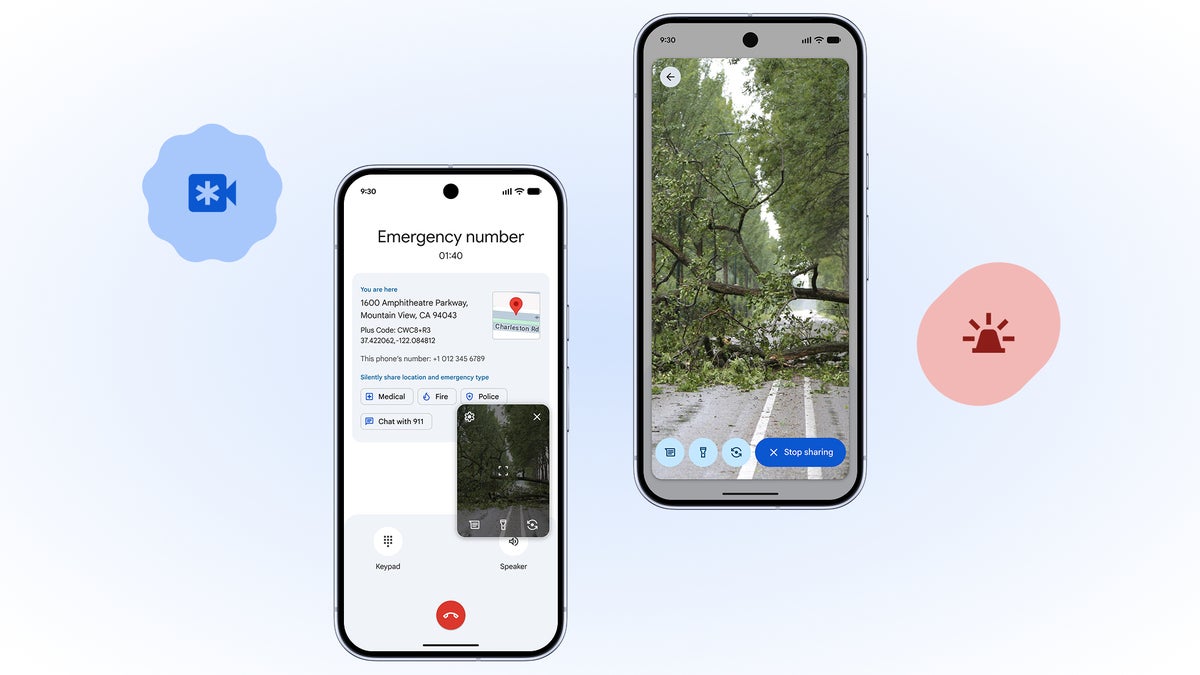
User dials 911 or uses the emergency shortcut on their Android device. The standard emergency call process begins as usual.
During the call, if the emergency center supports the feature, the user receives a prompt on their screen asking if they want to share live video.
The user must explicitly tap "Share Video" to activate the feature. No video is shared without explicit user consent during each emergency call.
Once activated, the device's camera begins streaming live footage to the emergency center. Users can switch between front and rear cameras.
911 dispatchers view the live stream on their consoles, gaining visual context that helps them assess the situation and guide the caller.
First responders receive the visual information before arriving, allowing for better preparation and potentially saving critical minutes.
Privacy & Security: Built with Protection in Mind
Google has implemented multiple layers of privacy and security protections to ensure user data remains secure while enabling this life-saving feature:
All video streams are encrypted from the user's device directly to the emergency center, preventing interception by third parties.
Users must actively opt-in each time they want to share video. The feature cannot be activated automatically or without user permission.
Video streams are not stored on Google's servers after the emergency call ends, unless required by local emergency response regulations.
Only authorized emergency personnel involved in handling the specific emergency call can access the live video feed.
Availability, Requirements & Setup
| Platform | Details | Status |
|---|---|---|
| Android Version | Requires Android 12 or higher. Optimized for Android 13 and newer versions. | Required |
| Google Services | Needs latest version of Google Play Services and the Phone app. | Required |
| Initial Rollout | Beginning in the United States, starting with select regions and emergency centers. | In Progress |
| Emergency Center Support | Dependent on local 911 centers upgrading their systems to receive video streams. | Expanding |
| International Expansion | Expected to expand to other countries following initial U.S. deployment and local regulatory approvals. | Planned |
| Device Compatibility | Works on most Android smartphones with cameras. Some older devices may have limited functionality. | Most Devices |
How to Set Up & Use Emergency Live Video
Check Compatibility
Ensure your device runs Android 12+ and has the latest Google Play Services updates installed.
Update Phone App
Make sure your Phone app (the default dialer) is updated to the latest version from the Google Play Store.
Enable Emergency Features
Go to Settings > Safety & Emergency to ensure emergency features are enabled on your device.
Test Feature Availability
During an emergency call, listen for or look for the video sharing prompt if supported by your local emergency center.
Important: Do not make test emergency calls to check for this feature. Only use during actual emergencies.
Potential Impact & Industry Response
The introduction of Emergency Live Video represents a significant advancement in how technology can enhance public safety. Early tests and pilot programs have shown promising results:
- Faster Assessment: Dispatchers can assess situations visually in seconds rather than relying solely on verbal descriptions
- Better Resource Allocation: Emergency services can send appropriate personnel and equipment based on visual information
- Improved Caller Guidance: Dispatchers can provide more specific instructions when they can see what the caller sees
- Enhanced Safety: First responders have better situational awareness before entering potentially dangerous situations
Industry & Expert Reactions
Emergency response experts and industry analysts have largely praised the feature while emphasizing important considerations:
"This technology has the potential to revolutionize emergency response by bridging the information gap between callers and responders. However, its success depends on widespread adoption by emergency centers and clear public education about how and when to use it."
Future Developments & Final Thoughts
Google has indicated that this is just the beginning of enhanced emergency features for Android. Future updates may include:
- Integration with medical information and emergency contacts
- Advanced location sharing improvements
- Multi-language support for diverse communities
- Accessibility enhancements for users with disabilities
The Bottom Line: Google's Emergency Live Video feature represents a meaningful step forward in leveraging smartphone technology to enhance public safety. While its effectiveness will depend on widespread emergency center adoption and proper user education, the potential to save lives and improve emergency response is significant.
As this feature rolls out across the United States and eventually to other countries, it sets a new standard for what emergency communication technology can achieve in the smartphone era.
Pro Tip: Even without this specific feature, ensure your emergency information (medical details, emergency contacts) is updated in your phone's safety settings. This information can be accessed by emergency responders even when your phone is locked.